Learn R Programming

flextable (version 0.9.11)

footnote: Add footnotes to flextable

Description

The function let add footnotes to a flextable object by adding some symbols in the flextable and associated notes in the footer of the flextable.

Symbols are added to the cells designated by the selection i and j. If you use i = c(1,3) and j = c(2,5), then you will add the symbols (or the repeated symbol) to cells [1,2] and [3,5].

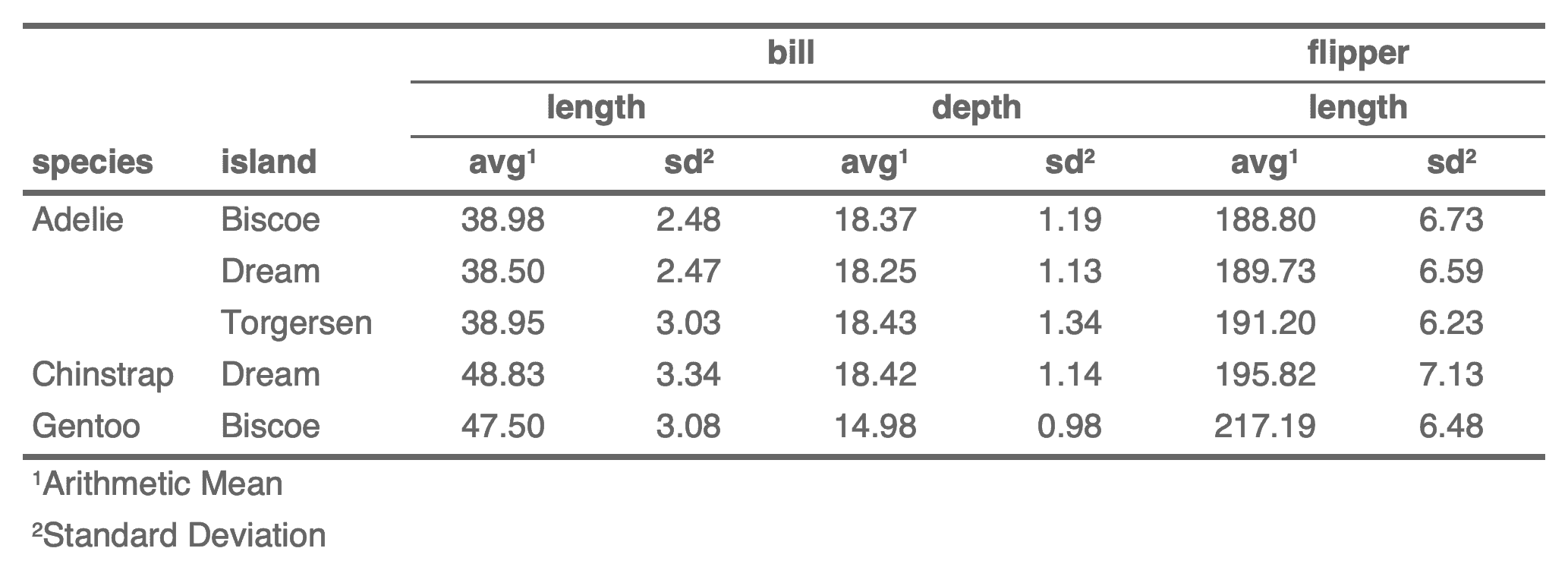
add_footer illustrationSee https://www.ardata.fr/en/flextable-gallery/2022-06-23-separate-headers/ for the example shown

Usage

footnote(
  x,
  i = NULL,
  j = NULL,
  value,
  ref_symbols = NULL,
  part = "body",
  inline = FALSE,
  sep = "; ",
  symbol_sep = ""
)

Arguments

x

a 'flextable' object, see flextable-package to learn how to create 'flextable' object.

i

row selector, see section Row selection with the i parameter in <Selectors in flextable>.

j

column selector, see section Column selection with the j parameter in <Selectors in flextable>.

value

a call to function as_paragraph().

ref_symbols

character value, symbols to append that will be used as references to notes.

part

part selector, see section Part selection with the part parameter in <Selectors in flextable>. Value 'all' is not allowed by the function.

inline

whether to add footnote on same line as previous footnote or not

sep

used only when inline = TRUE, character string to use as a separator between footnotes.

symbol_sep

separator to insert between multiple footnote symbols in the same cell (e.g. "," to produce 1,2 instead of 12). Default is "" (no separator, backward compatible).

Examples

Run this code
ft_1 <- flextable(head(iris))
ft_1 <- footnote(ft_1,
  i = 1, j = 1:3,
  value = as_paragraph(
    c(
      "This is footnote one",
      "This is footnote two",
      "This is footnote three"
    )
  ),
  ref_symbols = c("a", "b", "c"),
  part = "header"
)
ft_1 <- valign(ft_1, valign = "bottom", part = "header")
ft_1 <- autofit(ft_1)

ft_2 <- flextable(head(iris))
ft_2 <- autofit(ft_2)
ft_2 <- footnote(ft_2,
  i = 1, j = 1:2,
  value = as_paragraph(
    c(
      "This is footnote one",
      "This is footnote two"
    )
  ),
  ref_symbols = c("a", "b"),
  part = "header", inline = TRUE
)
ft_2 <- footnote(ft_2,
  i = 1, j = 3:4,
  value = as_paragraph(
    c(
      "This is footnote three",
      "This is footnote four"
    )
  ),
  ref_symbols = c("c", "d"),
  part = "header", inline = TRUE
)
ft_2

ft_3 <- flextable(head(iris))
ft_3 <- autofit(ft_3)
ft_3 <- footnote(
  x = ft_3, i = 1:3, j = 1:3,
  ref_symbols = "a",
  value = as_paragraph("This is footnote one")
)
ft_3

Run the code above in your browser using DataLab