cols_merge_n_pct: Merge two columns to combine counts and percentages
Description
The cols_merge_n_pct() function is a specialized variant of the
cols_merge() function. It operates by taking two columns that constitute
both a count (col_n) and a fraction of the total population (col_pct) and
merges them into a single column. What results is a column containing both
counts and their associated percentages (e.g., 12 (23.2%)). The column
specified in col_pct is dropped from the output table.
Usage
cols_merge_n_pct(data, col_n, col_pct, rows = everything(), autohide = TRUE)Value
An object of class gt_tbl.
Arguments
- data
A table object that is created using the
gt()function.- col_n
A column that contains values for the count component.
- col_pct
A column that contains values for the percentage component. This column should be formatted such that percentages are displayed (e.g., with
fmt_percent()).- rows
Rows that will participate in the merging process. Providing
everything()(the default) results in all rows incolumnsundergoing merging. Alternatively, we can supply a vector of row identifiers withinc(), a vector of row indices, or a helper function focused on selections. The select helper functions are:starts_with(),ends_with(),contains(),matches(),one_of(),num_range(), andeverything(). We can also use a standalone predicate expression to filter down to the rows we need (e.g.,[colname_1] > 100 & [colname_2] < 50).- autohide
An option to automatically hide the column specified as
col_pct. Any columns with their state changed to hidden will behave the same as before, they just won't be displayed in the finalized table.
Comparison with other column-merging functions
This function could be somewhat replicated using cols_merge(), however,
cols_merge_n_pct() employs the following specialized semantics for NA
and zero-value handling:
NAs incol_nresult in missing values for the merged column (e.g.,NA+10.2%=NA)NAs incol_pct(but notcol_n) result in base values only for the merged column (e.g.,13+NA=13)NAs bothcol_nandcol_pctresult in missing values for the merged column (e.g.,NA+NA=NA)If a zero (
0) value is incol_nthen the formatted output will be"0"(i.e., no percentage will be shown)
Any resulting NA values in the col_n column following the merge
operation can be easily formatted using the sub_missing() function.
Separate calls of sub_missing() can be used for the col_n and
col_pct columns for finer control of the replacement values. It is the
responsibility of the user to ensure that values are correct in both the
col_n and col_pct columns (this function neither generates nor
recalculates values in either). Formatting of each column can be done
independently in separate fmt_number() and fmt_percent() calls.
This function is part of a set of four column-merging functions. The other
three are the general cols_merge() function and the specialized
cols_merge_uncert() and cols_merge_range() functions. These functions
operate similarly, where the non-target columns can be optionally hidden from
the output table through the hide_columns or autohide options.
Examples
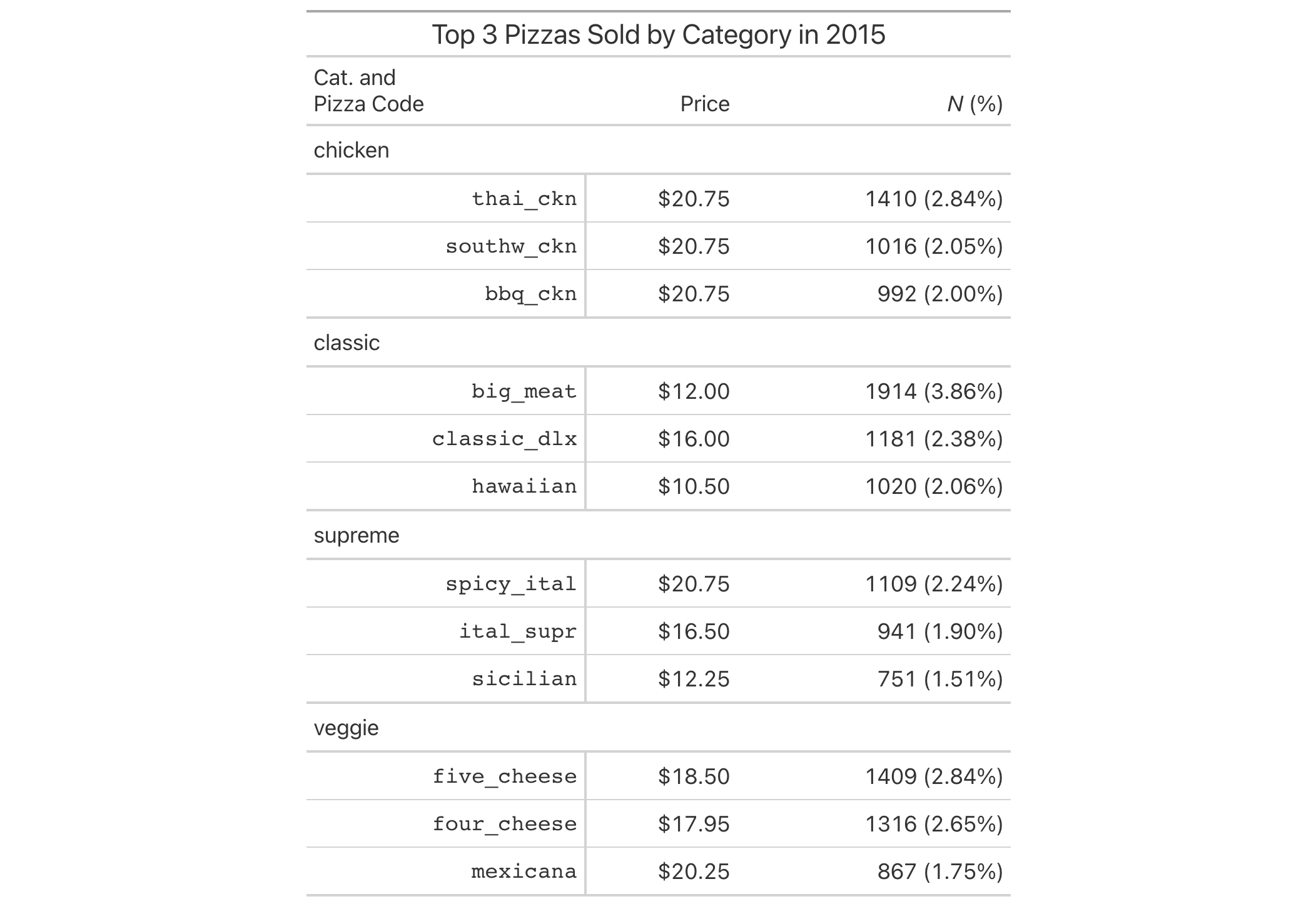
Use pizzaplace to create a gt table that displays the counts and
percentages of the top 3 pizzas sold by pizza category in 2015. The
cols_merge_n_pct() function is used to merge the n and frac columns
(and the frac column is formatted using fmt_percent()).
pizzaplace |>
  dplyr::group_by(name, type, price) |>
  dplyr::summarize(
    n = dplyr::n(),
    frac = n/nrow(pizzaplace),
    .groups = "drop"
  ) |>
  dplyr::arrange(type, dplyr::desc(n)) |>
  dplyr::group_by(type) |>
  dplyr::slice_head(n = 3) |>
  gt(
    rowname_col = "name",
    groupname_col = "type"
  ) |>
  fmt_currency(price) |>
  fmt_percent(frac) |>
  cols_merge_n_pct(
    col_n = n,
    col_pct = frac
  ) |>
  cols_label(
    n = md("*N* (%)"),
    price = "Price"
  ) |>
  tab_style(
    style = cell_text(font = "monospace"),
    locations = cells_stub()
  ) |>
  tab_stubhead(md("Cat. and  \nPizza Code")) |>
  tab_header(title = "Top 3 Pizzas Sold by Category in 2015") |>
  tab_options(table.width = px(512))
Function ID
5-14
Function Introduced
v0.3.0 (May 12, 2021)
See Also
Other column modification functions:
cols_align_decimal(),
cols_align(),
cols_hide(),
cols_label_with(),
cols_label(),
cols_merge_range(),
cols_merge_uncert(),
cols_merge(),
cols_move_to_end(),
cols_move_to_start(),
cols_move(),
cols_unhide(),
cols_width()