fmt_auto: Automatically format column data according to their values
Description
The fmt_auto() function will automatically apply formatting of various
types in a way that best suits the data table provided. The function will
attempt to format numbers such that they are condensed to an optimal width,
either with scientific notation or large-number suffixing. Currency values
are detected by currency codes embedded in the column name and formatted in
the correct way. Although the functionality here is comprehensive it's still
possible to reduce the scope of automatic formatting with the scope
argument and also by choosing a subset of columns and rows to which the
formatting will be applied.
Usage
fmt_auto(
  data,
  columns = everything(),
  rows = everything(),
  scope = c("numbers", "currency"),
  lg_num_pref = c("sci", "suf"),
  locale = NULL
)
Value
An object of class gt_tbl.
Arguments
- data
A table object that is created using the
gt()function.- columns
The columns to format. Can either be a series of column names provided in
c(), a vector of column indices, or a helper function focused on selections. The select helper functions are:starts_with(),ends_with(),contains(),matches(),one_of(),num_range(), andeverything().- rows
Optional rows to format. Providing
everything()(the default) results in all rows incolumnsbeing formatted. Alternatively, we can supply a vector of row captions withinc(), a vector of row indices, or a helper function focused on selections. The select helper functions are:starts_with(),ends_with(),contains(),matches(),one_of(),num_range(), andeverything(). We can also use expressions to filter down to the rows we need (e.g.,[colname_1] > 100 & [colname_2] < 50).- scope
The scope of automatic formatting. By default this includes
"numbers"-type values and"currency"-type values though the scope can be reduced to a single type of value to format.- lg_num_pref
The preference toward either scientific notation for very small and very large values (
"sci", the default option), or, suffixed numbers ("suf", for large values only).- locale
An optional locale identifier that can be used for formatting the value according the locale's rules. Examples include
"en"for English (United States) and"fr"for French (France). The use of a locale ID will override any locale-specific values provided. We can use theinfo_locales()function as a useful reference for all of the locales that are supported.
Targeting cells with <code>columns</code> and <code>rows</code>
Targeting of values is done through columns and additionally by rows (if
nothing is provided for rows then entire columns are selected). The
columns argument allows us to target a subset of cells contained in the
resolved columns. We say resolved because aside from declaring column names
in c() (with bare column names or names in quotes) we can use
tidyselect-style expressions. This can be as basic as supplying a select
helper like starts_with(), or, providing a more complex incantation like
where(~ is.numeric(.x) && max(.x, na.rm = TRUE) > 1E6)
which targets numeric columns that have a maximum value greater than
1,000,000 (excluding any NAs from consideration).
By default all columns and rows are selected (with the everything()
defaults). Cell values that are incompatible with a given formatting function
will be skipped over, like character values and numeric fmt_*()
functions. So it's safe to select all columns with a particular formatting
function (only those values that can be formatted will be formatted), but,
you may not want that. One strategy is to format the bulk of cell values with
one formatting function and then constrain the columns for later passes with
other types of formatting (the last formatting done to a cell is what you get
in the final output).
Once the columns are targeted, we may also target the rows within those
columns. This can be done in a variety of ways. If a stub is present, then we
potentially have row identifiers. Those can be used much like column names in
the columns-targeting scenario. We can use simpler tidyselect-style
expressions (the select helpers should work well here) and we can use quoted
row identifiers in c(). It's also possible to use row indices (e.g.,
c(3, 5, 6)) though these index values must correspond to the row numbers of
the input data (the indices won't necessarily match those of rearranged rows
if row groups are present). One more type of expression is possible, an
expression that takes column values (can involve any of the available columns
in the table) and returns a logical vector. This is nice if you want to base
formatting on values in the column or another column, or, you'd like to use a
more complex predicate expression.
Examples
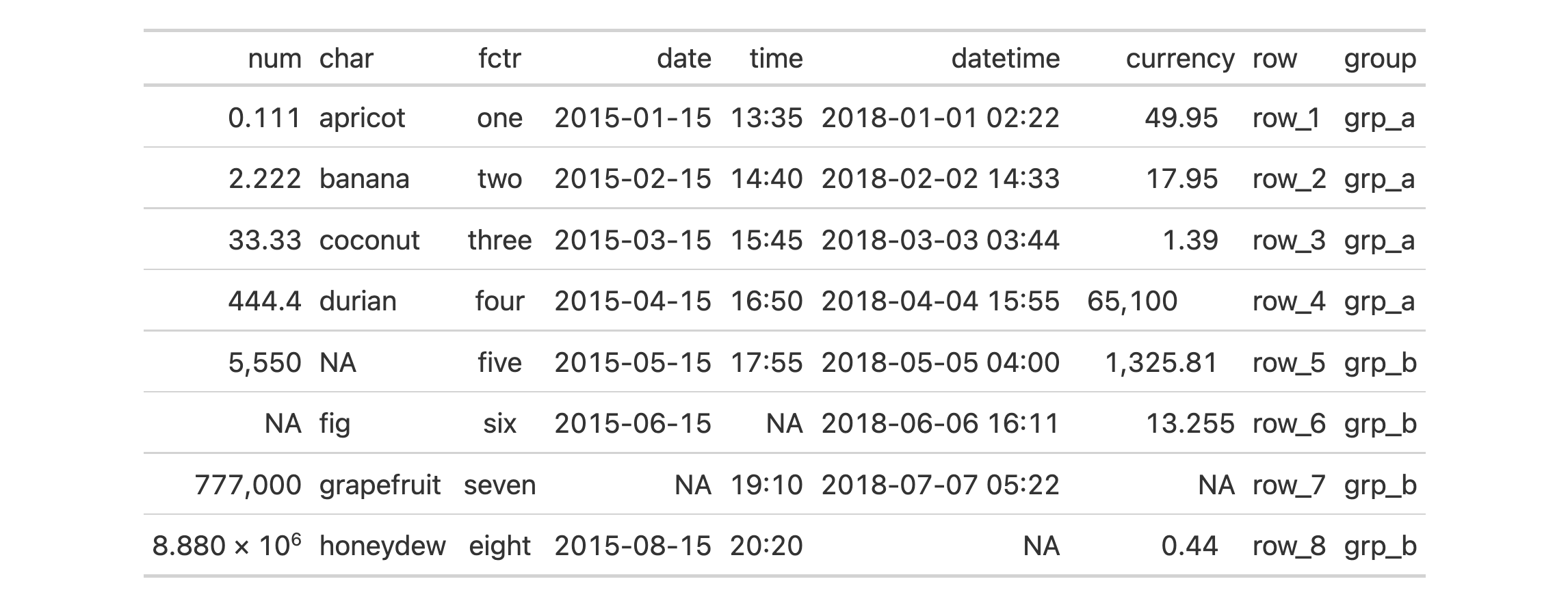
Use exibble to create a gt table. Format the columns automatically
with fmt_auto().
exibble |>
  gt() |>
  fmt_auto()
Let's now use countrypops to create another gt table. Automatically
format all columns with fmt_auto() but elect to use large-number suffixing
instead of scientific notation with the lg_num_pref = "suf" option.
countrypops |>
  dplyr::select(country_code_3, year, population) |>
  dplyr::filter(country_code_3 %in% c("CHN", "IND", "USA", "PAK", "IDN")) |>
  dplyr::filter(year > 1975 & year %% 5 == 0) |>
  tidyr::spread(year, population) |>
  dplyr::arrange(desc(`2020`)) |>
  gt(rowname_col = "country_code_3") |>
  fmt_auto(lg_num_pref = "suf")

Function ID
3-23
Function Introduced
In Development
See Also
Other data formatting functions:
data_color(),
fmt_bins(),
fmt_bytes(),
fmt_currency(),
fmt_datetime(),
fmt_date(),
fmt_duration(),
fmt_engineering(),
fmt_flag(),
fmt_fraction(),
fmt_image(),
fmt_index(),
fmt_integer(),
fmt_markdown(),
fmt_number(),
fmt_partsper(),
fmt_passthrough(),
fmt_percent(),
fmt_roman(),
fmt_scientific(),
fmt_spelled_num(),
fmt_time(),
fmt_url(),
fmt(),
sub_large_vals(),
sub_missing(),
sub_small_vals(),
sub_values(),
sub_zero()